How to Create a WordPress Blog from Scratch (Step-by-Step Guide)
Starting a blog is one of the most exciting ways to share your ideas, build an online presence, or even start earning money online. And when it comes to blogging platforms, WordPress stands out as the most popular and beginner-friendly option.
Whether you want to start a personal blog, travel blog, or business website, this step-by-step guide will help you create a WordPress blog from scratch — even if you have no technical experience.
🧩 Step 1: Understand What WordPress Is
Before jumping into setup, let’s clear up a common confusion — there are two types of WordPress:
- WordPress.com – A hosted platform where your blog is managed by WordPress itself. It’s easy to use but has limitations in customization and monetization.
- WordPress.org – A self-hosted platform that gives you full control over your blog. You can install themes, plugins, and monetize your site as you like.
If you want to create a professional blog with full control, use WordPress.org. That’s what we’ll cover in this guide.
💻 Step 2: Choose a Domain Name and Web Hosting
To start your blog, you need two essential things:
- A domain name – This is your blog’s web address (e.g.,
www.yourblogname.com). - A web hosting provider – This is where all your blog files and data are stored online.
🔹 How to Choose a Domain Name
When picking your domain, keep these points in mind:
- Keep it short and simple (easy to spell and remember).
- Avoid numbers and hyphens.
- Choose a name that reflects your niche (e.g., “HealthyLivingHub.com” for a wellness blog).
- Use a .com extension if available.
You can buy domains from sites like Namecheap, GoDaddy, or directly from your hosting provider.
🔹 Choosing a Hosting Provider
Popular hosting options for beginners include:
- Bluehost
- Hostinger
- SiteGround
- DreamHost
Most hosting companies offer a 1-click WordPress installation option, making setup easy even for beginners.
⚙️ Step 3: Install WordPress
Once you purchase hosting, you’ll receive login credentials for your hosting dashboard (cPanel). Most hosting providers have a “WordPress Installer” button or an “Auto Install” section.
Simply:
- Click “Install WordPress.”
- Choose your domain name.
- Fill in basic details (site name, username, password).
- Click Install.
Within a few minutes, you’ll get your WordPress login link, which usually looks like this:
🎨 Step 4: Choose and Install a Theme
Your theme decides how your blog looks and feels. WordPress offers thousands of free and premium themes.
🔹 How to Install a Theme:
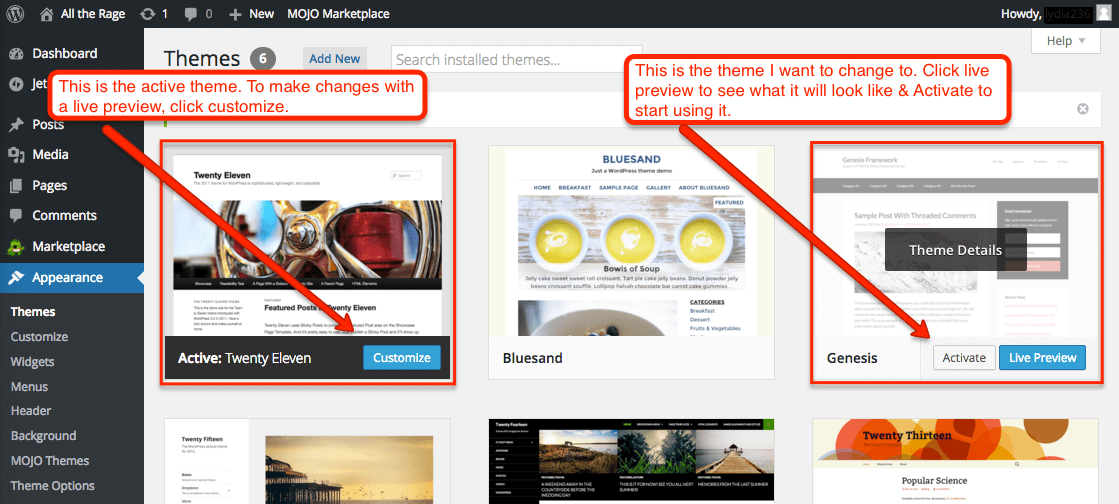
- Go to your WordPress Dashboard → Appearance → Themes → Add New.
- Browse free themes or upload one you purchased.
- Click Install and then Activate.
🔹 Recommended Beginner-Friendly Themes:
- Astra
- OceanWP
- GeneratePress
- Neve
- Kadence
All these themes are lightweight, customizable, and mobile-friendly.
You can also use page builders like Elementor or Beaver Builder to design your blog without coding.
🧭 Step 5: Customize Your Blog Settings
Now it’s time to give your blog a personal touch.
🔸 Update Site Title and Tagline
Go to Settings → General and edit your Site Title and Tagline to match your blog’s purpose.
🔸 Set Your Homepage
If you want a static homepage instead of showing your latest posts, go to:
Settings → Reading → Your homepage displays → A static page.
🔸 Create Essential Pages
Every blog should have a few important pages:
- Home – Welcomes visitors and shows what your blog is about.
- About – Tells your story or your brand’s purpose.
- Blog – Displays your latest posts.
- Contact – Allows readers to get in touch with you.
- Privacy Policy – A legal must-have if you collect any data.
✍️ Step 6: Start Writing Your First Blog Post
Now comes the fun part — writing your first post!
Go to your dashboard → Posts → Add New.
You’ll see the WordPress Gutenberg editor, which lets you add:
- Headings
- Paragraphs
- Images
- Lists
- Quotes
- Links
🪄 Blogging Tips for Beginners:
- Write in a friendly, conversational tone.
- Break text into short paragraphs for better readability.
- Add relevant images and internal links.
- Use keywords naturally to improve SEO.
- End each post with a call-to-action (CTA) like “Leave a comment” or “Subscribe to our newsletter.”
When ready, click Publish — and your first post goes live!
🧰 Step 7: Install Essential Plugins
Plugins extend your blog’s functionality — think of them as apps for your WordPress site.
🔹 Must-Have Plugins:
| Plugin | Purpose |
|---|---|
| Yoast SEO | Helps with search engine optimization |
| Akismet Anti-Spam | Protects your blog from spam comments |
| WP Super Cache | Boosts site speed |
| UpdraftPlus | Creates backups of your blog |
| Elementor | Drag-and-drop page builder for design |
| WPForms | Creates contact forms easily |
To install a plugin:
- Go to Plugins → Add New.
- Search the plugin name.
- Click Install Now and then Activate.
🚀 Step 8: Optimize Your Blog for SEO
To attract visitors, you’ll need to optimize your blog for search engines.
🔸 SEO Basics:
- Use SEO-friendly URLs (e.g.,
/how-to-start-a-blog/instead of/p=123). - Install Yoast SEO or Rank Math plugin to optimize titles and meta descriptions.
- Use keywords naturally in your titles, headings, and body text.
- Add alt text to all images.
- Make your website mobile-friendly and fast-loading.
These small steps can make a big difference in your blog’s visibility on Google.
💵 Step 9: Monetize Your Blog
Once you have steady traffic, you can start earning from your blog. Some popular ways include:
- Google AdSense – Display ads and earn from clicks.
- Affiliate Marketing – Promote products and earn commissions.
- Sponsored Posts – Partner with brands for paid content.
- Sell Digital Products – Offer eBooks, courses, or templates.
- Offer Services – Use your blog to promote your freelance or coaching services.
Remember, consistency is key. Keep posting valuable content and promoting your blog on social media.
🧩 Step 10: Maintain and Update Your Blog
Running a successful WordPress blog doesn’t end at publishing.
You must keep it secure, updated, and engaging.
- Regularly update WordPress, themes, and plugins.
- Back up your site often.
- Reply to comments to build community.
- Monitor analytics using Google Analytics or Jetpack.
- Refresh old posts to keep them relevant.
A well-maintained blog grows faster and ranks higher over time.
✅ Final Thoughts
Creating a WordPress blog from scratch might seem technical, but it’s actually simple once you follow the steps. From picking a domain to publishing your first post, everything can be done in a few hours.
Your blog can become more than just a hobby — it can be a powerful platform to share your passion, grow your brand, and even build a full-time income.
So don’t wait — start your WordPress blog today, and let your ideas shine online!
💬 FAQs About Creating a WordPress Blog from Scratch
1. Do I need coding skills to start a WordPress blog?
No. WordPress is designed for beginners, and most tasks like design or publishing can be done without any coding.
2. How much does it cost to start a WordPress blog?
It usually costs between $30–$100 per year, depending on your domain and hosting plan. WordPress software itself is free.
3. Can I change my blog theme later?
Yes, you can switch themes anytime. However, always preview the new theme before activating it to ensure your design and layout look good.
4. How often should I post on my blog?
It depends on your schedule, but consistency is more important than frequency. Aim for at least one quality post per week.
5. Can I make money from my WordPress blog?
Absolutely! You can monetize your blog through ads, affiliate marketing, digital products, or services once you start getting regular visitors.
Related Posts






Latest Collection
Recent Works